Platform Release 9.4.0
The theme for this Minor release is enhancements designed to help you accomplish more with fewer interruptions. This release expands access to key capabilities in the Modern Browser Experience, improves navigation flexibility, and provides richer context for analysis and decision-making.
See the 9.4.0 Platform Release Highlights course.
Select a link to go to that section:
Highlights
-
Scale your applications to meet growing data and long-term retention needs with Data Tier Expansion, now available.
-
Search for assemblies across Workspaces using the Select Workspace Object and Object Lookup dialog boxes.
-
Display clear, user-friendly labels in data adapter-driven outputs using the Workflow Profile Description.
-
The Modern Browser Experience was enhanced to include an Application tab, multi-tab browser navigation, Quick Views in Spreadsheet, and the Transformation Rules page, as well as several bug fixes.
New Features
Data Tier Expansion
-
Accommodate continued data growth and longer-term retention needs with Data Tier Expansion, now generally available. With support for up to 100 TB of storage capacity, you will have greater flexibility to scale your applications as business requirements evolve. For additional information regarding availability and adoption planning, please contact your Customer Success Manager. (PF9-1699)
Enhancements
Assembly Search
-
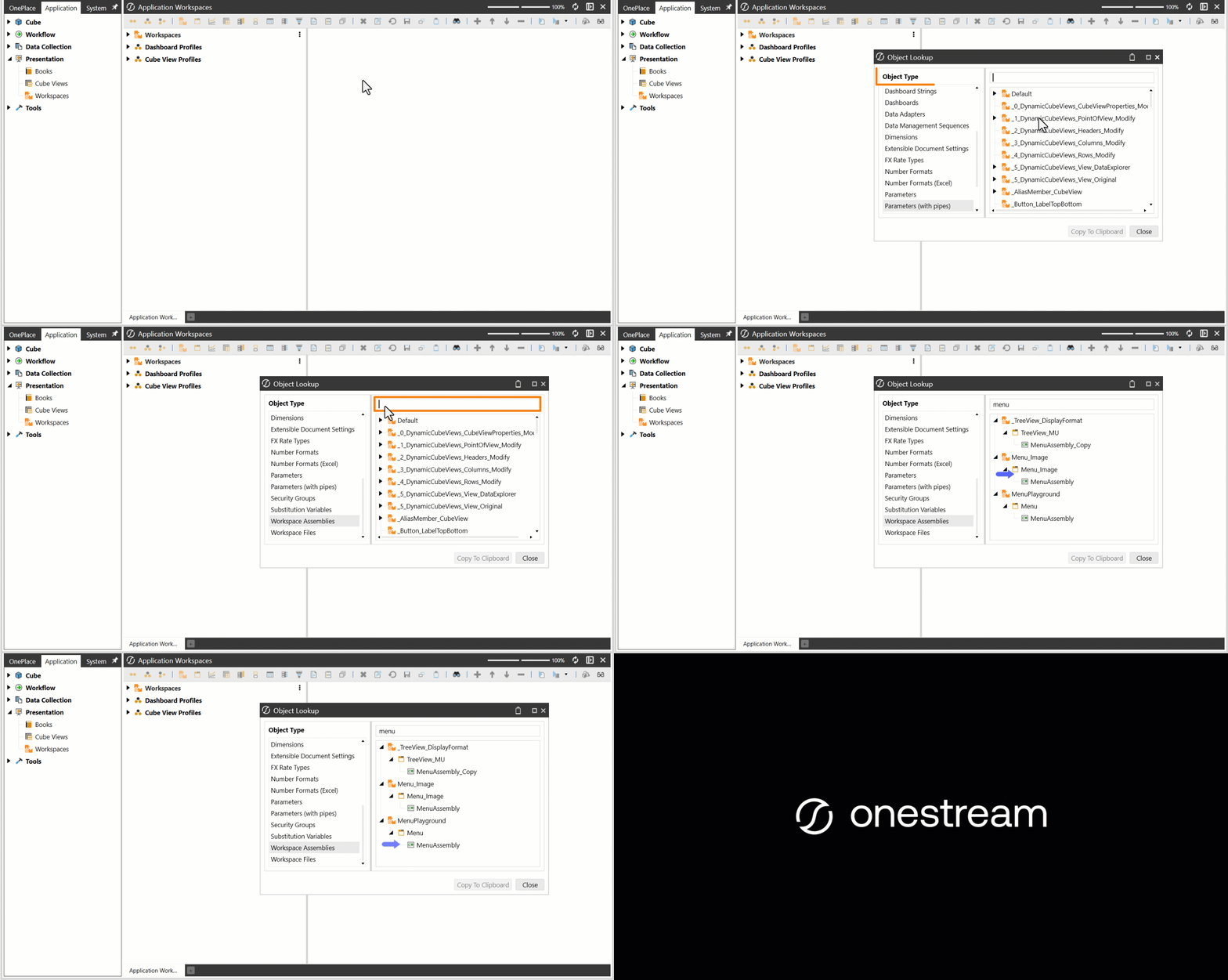
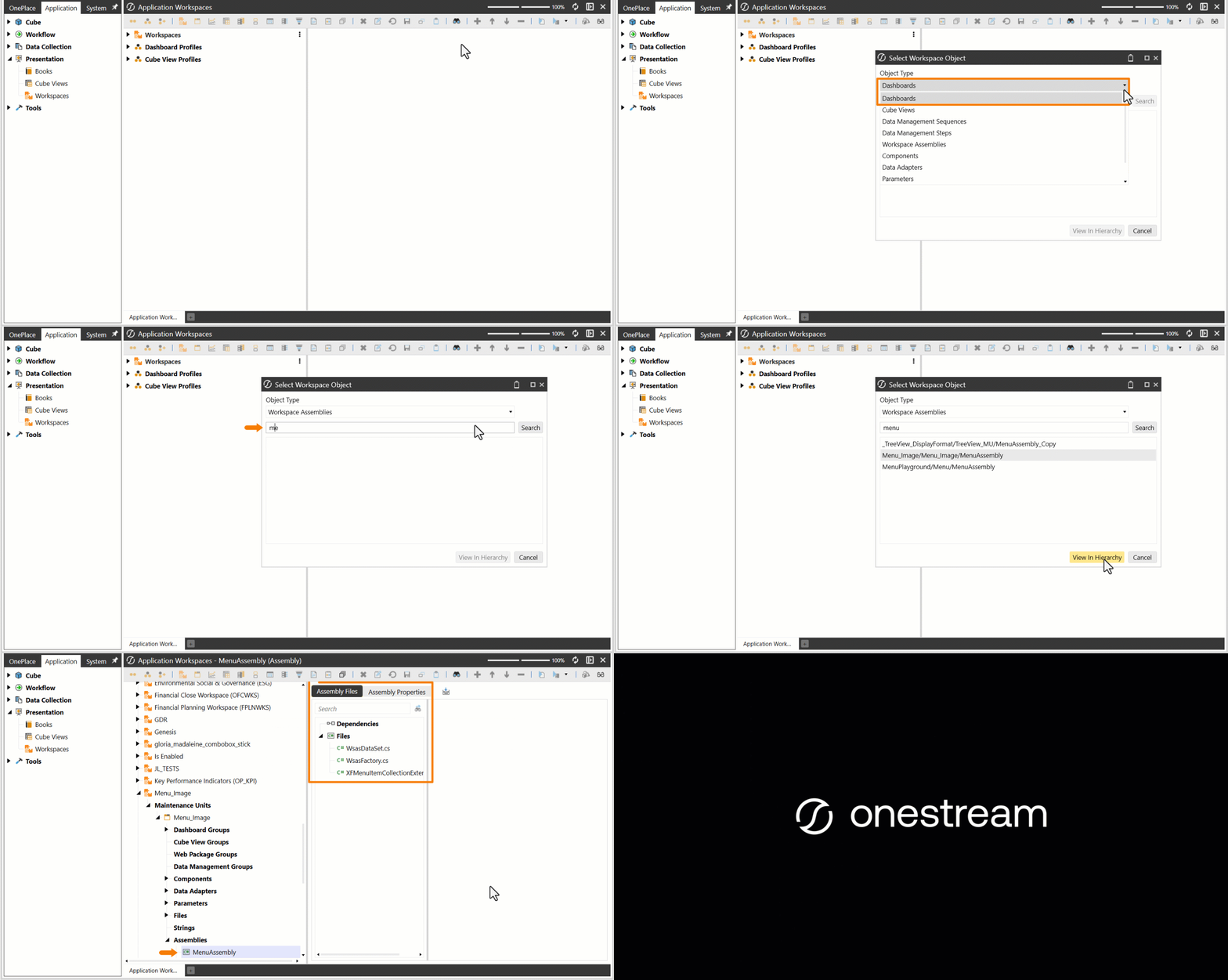
Select Workspace Object and Object Lookup: Save time and streamline navigation by searching for assemblies across Workspaces directly from the Select Workspace Object and Object Lookup dialog boxes. (PF6-7873, PF6-7875)
Data Adapters
-
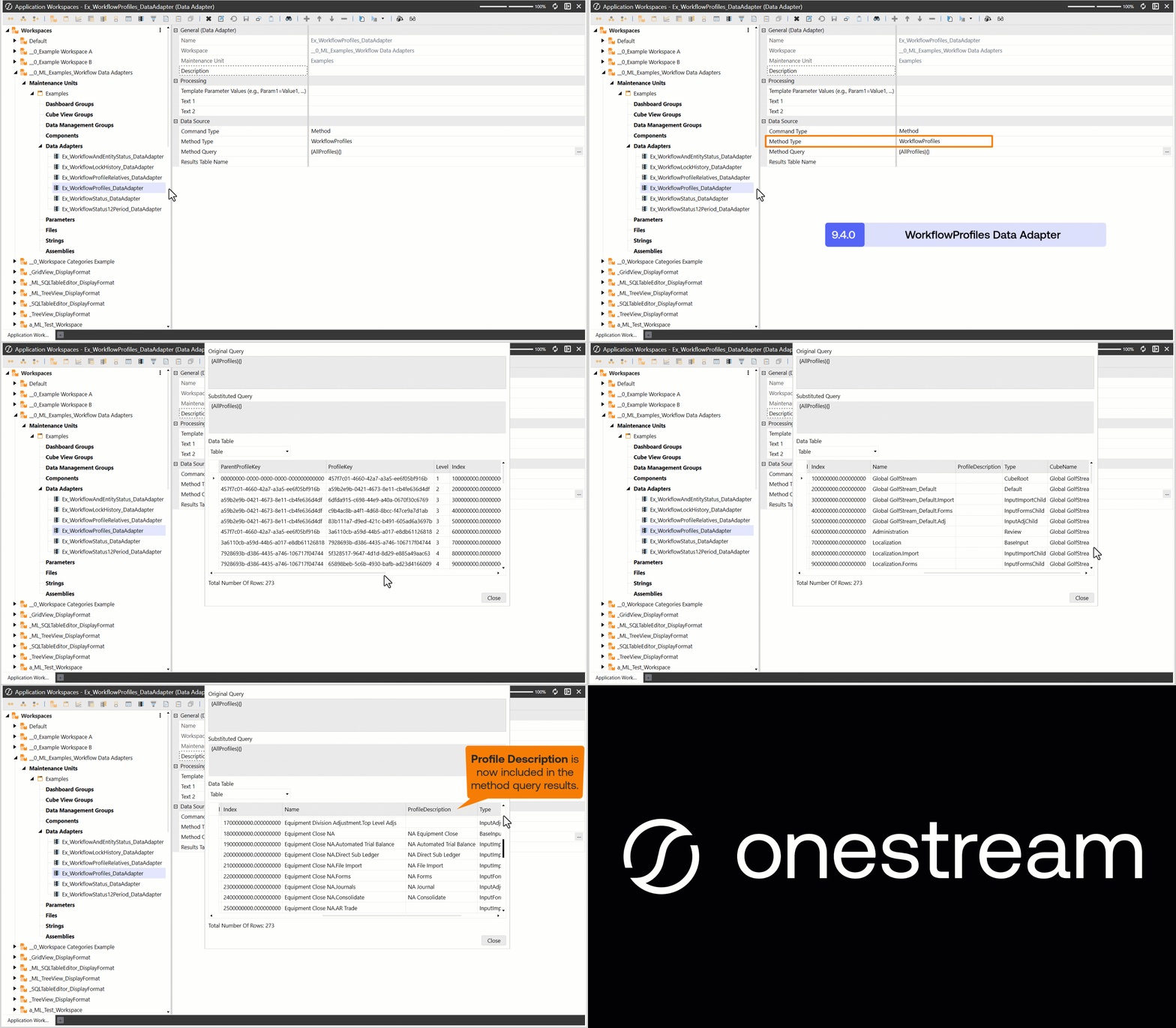
Workflow Profile Description: Display clear, user-friendly Workflow Profile descriptions in reports, dashboards, queries, and other outputs to deliver richer context and improve understanding.
Modern Browser Experience
-
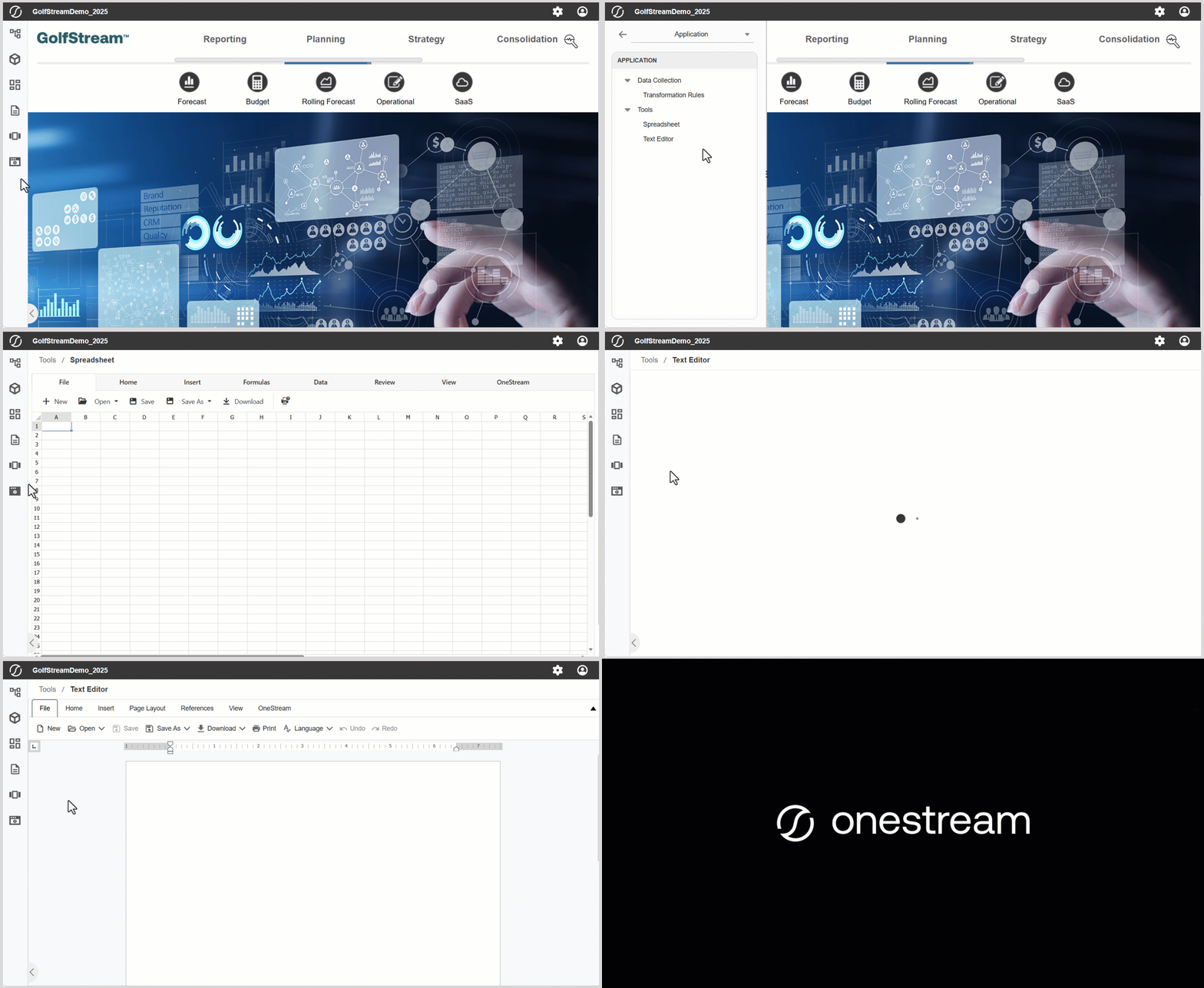
Application Tab: Work more efficiently with seamless access to Application tab features like Spreadsheet and Text Editor directly from the Modern Browser Experience.
-
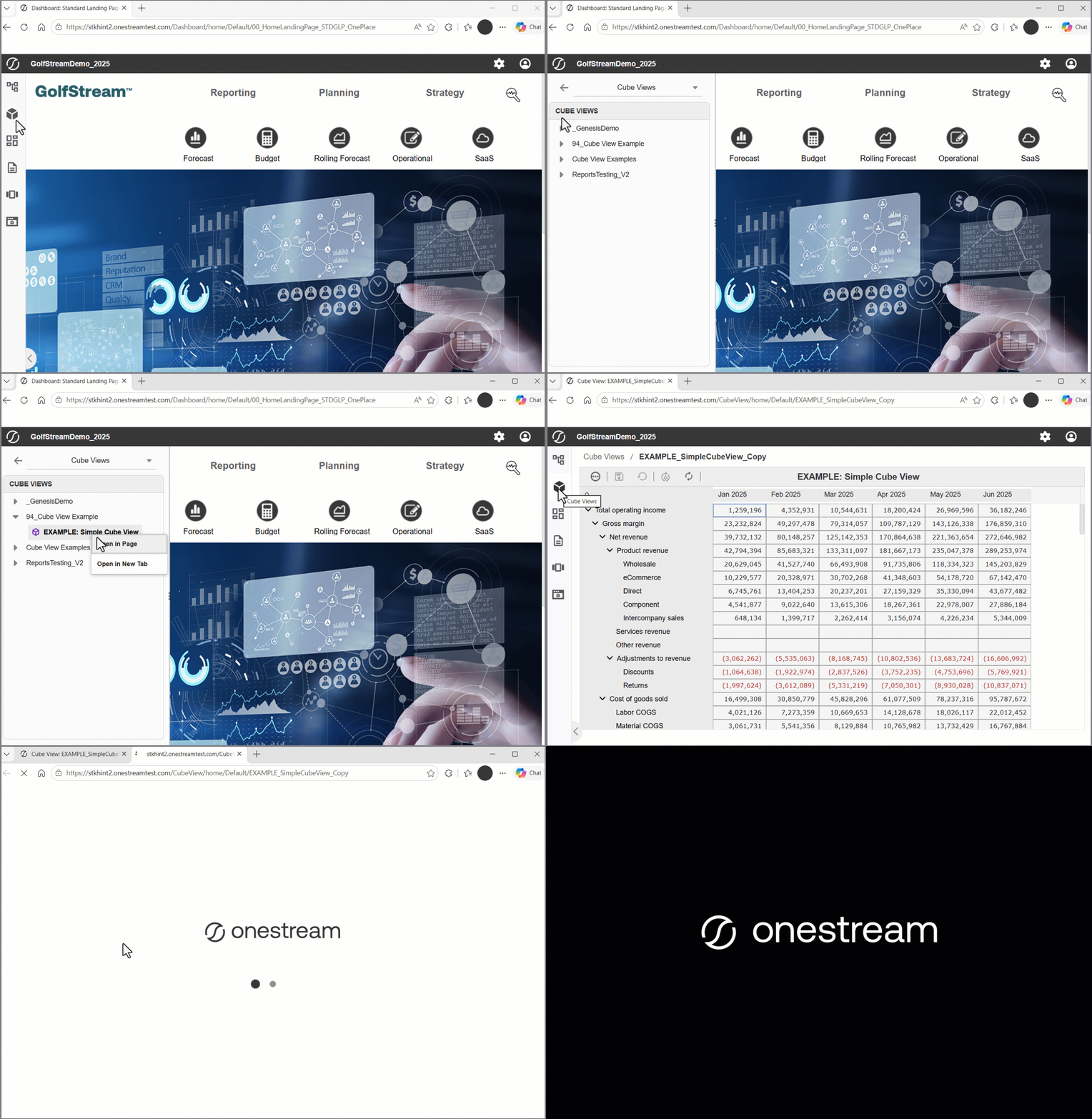
Browser Tabs: Enhance navigation flexibility by opening Cube Views, dashboards, workflow steps, and Application tab items in separate browser tabs, enabling more efficient access to application content.
-
Quick Views in Spreadsheet: Deliver faster insights with Quick Views in Spreadsheet, available in the Modern Browser Experience, enabling ad hoc analysis directly from dashboards and the Application tab without interrupting your workflow.

-
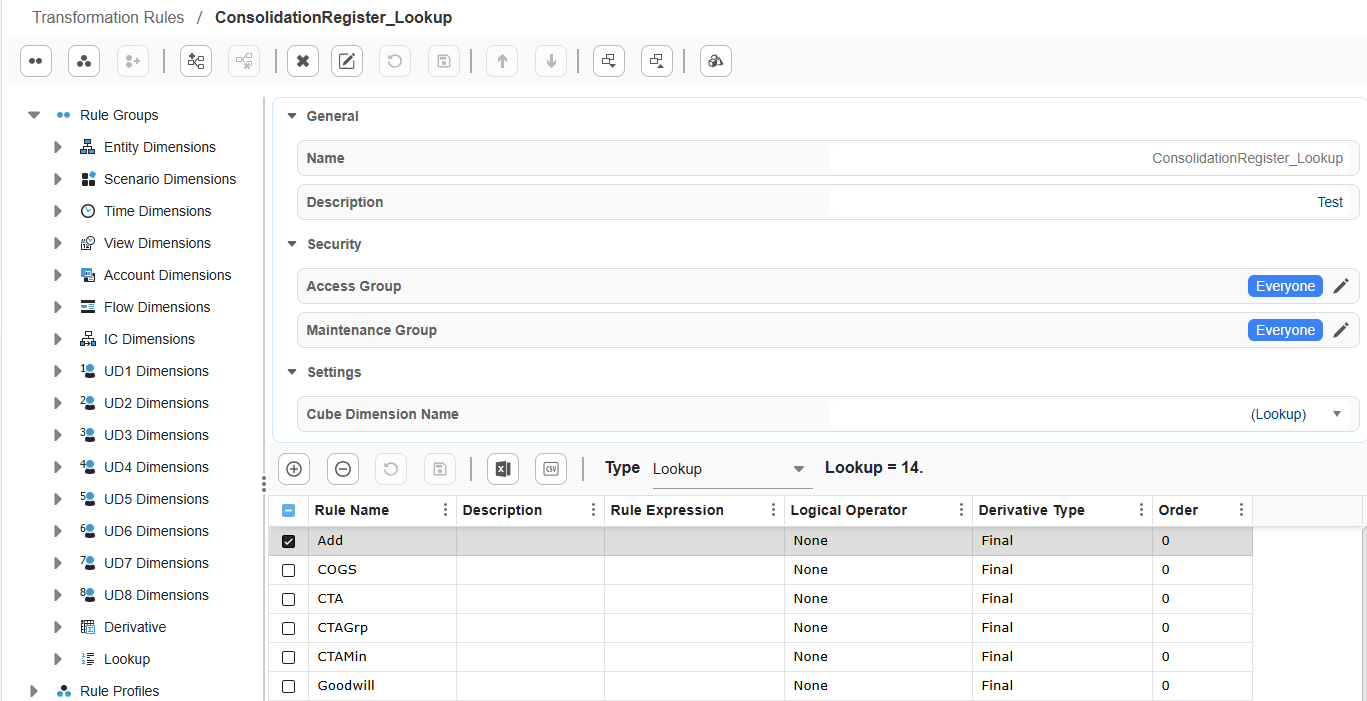
Transformation Rules Page: Streamline transformation rule management by viewing and maintaining rules directly in the Modern Browser Experience from the Transformation Rules page and Edit Transformation Rules dialog box. These enhancements let users work more efficiently, maintaining focus by not leaving their current workflow.
Smart Integration Connector
-
Memory Management: Improve performance and optimize memory management in server-based deployments with the Server Garbage Collection (GC) mode enabled by default as the SIC Gateway Service for new installs and upgrades. For added administrative visibility, the active GC mode is also logged at startup. (PF2-17120)
Fixed Issues
Dashboards
-
Dashboard Bound Parameters Sync after Refresh: Refresh or redraw dashboards to align bound parameters with the latest user selection after loading.
CAUTION: Bound parameters do not hold values from a prior user selection, so they cannot be stored in the dashboard for later use.
NOTE: Dashboards whose components have a bound parameter and Apply Selected Value to Current Dashboard to True may behave differently after refresh in Platform Version 9.4.0. Review the dashboard components' Action section to confirm expected behavior.
Workspace Assemblies
- Workspace Assembly Service Factory: Resolved compiler caching inconsistencies affecting multi-nested Workspace assembly dependencies, improving stability and consistency of assembly compilation. (PF6-8731)
Modern Browser Experience
-
Combo Box: Maintain consistent single-select combo box behavior when navigating across dashboards. (PF3-15971)
-
Workflows: Complete workflows faster with the Complete Workflow button added directly to the Import Step page.
-
Task Activity: Refresh the Task Activity dialog box with the built-in Refresh button to pull the latest updates instantly. (PF3-16591)
-
Dashboards Display: Display Cube Views at full size with vertical stack panel layouts, which no longer restrict component dimensions. Additionally, notifications prompted by business rules render line spacing correctly, ensuring the information is clear, polished, and easy to read. (PF3-16645, PF4-13310)
-
Navigation Panel: Search and find workflow scenarios more easily with names and descriptions both displayed and searchable in OnePlace. (PF3-16825)
-
BI Viewer: BI Viewer delivers accurate data even under heavy concurrent usage, keeping high-traffic dashboards reliable for every user. (PF3-16831)
-
SQL Table Editor: Catch duplicate primary key entries immediately with a validation error when a duplicate is added.
-
Cube Views Display: Scan data more easily with significantly reduced row header indentation, and expand trees from a row header without the display moving to the top of the Cube View. (PF3-16900, PF4-12222)
-
Labels: Dynamically set label values to display reliably in dashboards so users always see accurate, current information. (PF4-11622)
-
Buttons: Dashboard buttons correctly reflect the dynamically set display format parameters, ensuring your dashboards look and behave exactly as designed. (PF4-11624)
-
Completed Workflows in Cube Views: Data integrity is protected by ensuring Cube Views linked to completed workflows remain read-only, preventing unintended changes to finalized work. (PF4-12096)
-
File Viewer: Prevent errors by prompting users to enter required parameters before opening a book. (PF4-12096)
-
Dashboard Scrolling: Scrollbars display automatically on components and dashboards when browser zoom exceeds 100% and use vertical splitters that you can drag in the dashboard grid layout. (PF4-13385, PF4-13470)
-
Date Formatting: Display dates accurately in the correct format when using the French culture setting. Incorrect default date values do not display after edits. (PF4-13501)
Deprecation
-
Native Authentication: OneStream intends to deprecate native authentication starting in the Platform Version 10.0.0 release. We recommend all customers currently using native authentication analyze their security model to determine impact to access and begin planning a transition to an external identity provider in preparation for future upgrades.
For guidance on configuring external identity providers, see the Identity and Access Management Guide.
-
Basic Chart Component: The Basic Chart will no longer be available as a new dashboard component. The Basic Chart component will continue to function and support edit, copy/paste, and XML file loading until it is deprecated from the OneStream Platform.
- WinSCP: WinSCP, most commonly used in Secure File Transfer Protocol (SFTP) data integration processes, has been deprecated and will no longer be included in the Platform and Smart Integration Connector as a natively referenced DLL. OneStream recommends using SSH.Net for SFTP integrations. Existing customers that use WinSCP and are preparing to upgrade to this release are encouraged to convert their WinSCP processes to use SSH.Net.
-
VPN and ExpressRoute: VPN or ExpressRoute used with OneStream cloud on Platform Versions earlier than 8.0.0 reached End of Service on 31 August 2024. All customers using VPN or ExpressRoute who are upgrading to Platform Version 8.0.0 or later will be required to migrate to Smart Integration Connector to integrate with local data sources. Smart Integration Connector provides secure connectivity between a OneStream SaaS instance and customer data sources residing within a local network.
-
BRApi.Utilities.EncryptText and BRApi.Utilities.DecryptText: The following BRApis have been removed from Platform: BRApi.Utilities.EncryptText and BRApi.Utilities.DecryptText. Please update your business rules to use Key Management - Secrets found within the Cloud Administration Tools Marketplace Solution, or integrate with your own third-party secrets provider. (PF7-4417)
-
BRApi.Utilities.GetAppServerPerformanceInfo: The Business Rule API BRApi.Utilities.GetAppServerPerformanceInfo is scheduled for removal in a future release in a manner consistent with our sunset policy. (PF7-10286)
-
Is Mobile Maintenance Unit Property: The Is Mobile Maintenance Unit property has been removed. All dashboards will have all available drop-down settings and will not display limited options. (PF6-8120)
-
BinaryFormatter Serialization Method: The BinaryFormatter serialization method is no longer supported in any reference case, including in business rules and Member Formulas. See the BinaryFormatter Microsoft Learn article. (PF2-15930)
-
OneStream Solutions: For a list of solutions designated to move to Community Solutions or be sunset, see Solution Compatibility.
Upgrade Information
Refer to Requirements for important notices and details regarding planning your upgrade.
-
.NET 10 Impact: .NET 10 Desktop Runtime must be installed to local desktops and laptops to successfully operate the Windows Application Client in a Platform Version 9.3.0 or later environment. (PF-36466)
-
Smart Integration Connector: When upgrading Smart Integration Connector and using custom database connections, you must reconfigure your connections and drivers due to DLL compatibility changes with .NET 10.
-
System Time Synchronization Requirement: All user workstations and server environments must maintain accurate system time for reliable authentication behavior. Standard industry security protocols require the client device and OneStream server to be aligned in system time. Accurate and synchronized device clocks help ensure stable authentication and consistent user access.
Before upgrading and as part of regular environment maintenance, follow this guidance:
-
Configure all user machines to sync automatically with an approved internet or domain time source.
-
Ensure domain policies allow devices to maintain accurate time and minimize drift.
-
Any users unable to sync their system clock should work with their internal IT teams to correct the configuration.
If needed, contact OneStream Support. (PF11-1728)
-
-
Stage Table Implementation: Platform Version 9.0.0 introduced a streamlined stage table implementation, yielding several benefits:
-
Reduced stage table data storage
-
More predictable data load performance throughout the year
-
Greater database stability for customers with higher volume stage activity
If you are upgrading from a Platform Version earlier than 9.0.0, the table optimizations may require you to change stage-related queries and rules to maintain existing operational behavior.
See the OneStream 9.0 Stage Schema Changes post on Community.
-
-
Database Server: As of Platform Version 9.2.0, the default rights of the Administrators group to the Database Server have been modified to be configurable. The Administrators group is no longer defaulted to have rights to the Ancillary Table Security roles. The Administrators group must be assigned to the OneStream Database Server Security roles for Access Group for Ancillary Tables, Maintenance Group for Ancillary Tables, and Table Creation Group for Ancillary Tables.
-
Database Page: As of Platform Version 9.2.0, the Application Administrator rights to access the contents of the Database page are no longer provisioned using the Application Security role of Administer Application. Provisioning access to the content of the Database page is configured using the OneStream Database Server Security role Access Group for Platform Tables.
-
Database Page: When upgrading to Platform Version 9.2.0 or later, ensure that access to the Database page is configured correctly so that the correct users have access to the External Databases.
-
Database Schema Updates: Framework and application database schema updates are required for this upgrade. Full database backups are recommended.
-
Platform Code: Platform code migrated from System.Data.SqlClient to Microsoft.Data.SqlClient.
-
OneStream Domains: The IP address of your OneStream environment will change when you upgrade to Platform Version 9.0.0 or later. If your IT has an outbound allow list (for example, using network security systems), you may not be able to access the new Platform environment until your OneStream domains are allowed. We recommend allowing all your OneStream domains instead of IPs in relevant network security systems because the IPs will be dynamic going forward.
Domains:
-
<sitename>.onestreamcloud.com
-
<sitename-dev>.onestreamcloud.com
If you have questions or need assistance, open a Case.
-
Compatibility
- Windows Server: OneStream supports Windows Server 2019 and 2022.
-
Windows: OneStream Client operation supports Windows 10 and 11.
-
.NET 8 Compatibility: Microsoft has announced end of support for .NET 8 on 10 November 2026. Details are available at https://dotnet.microsoft.com/en-us/platform/support/policy. OneStream continues to use Microsoft's Long-Term Support (LTS) .NET versions, which are released every two years and supported by Microsoft for three years. OneStream Platform Version 9.4.0 uses the .NET 10 development framework.
-
OneStream Solutions: For a list of solutions and compatible platform versions, see Solution Compatibility.
-
Standard Application Reports: Customers with Standard Application Reports PV6.4.0 SV1.0.1 (RPTA) installed must perform the following actions to upgrade to Platform Version 9.0.0 or later as Standard Application Reports, Standard System Reports, and Security Audit Reports are consolidated into the Navigation Center solution.
-
Uninstall the Standard Application Reports solution in the current Platform version before upgrading to Platform Version 9.0.0 or later. Failure to uninstall Standard Application Reports will result in business rule compilation errors when upgrading to Platform Version 9.0.0 or later.
-
After upgrading to Platform Version 9.0.0 or later, install the current version of the Navigation Center solution, which includes Standard Application Reports, Standard System Reports, and Security Audit Reports.
The current version of Navigation Center is PV9.1.0 SV1.0.0.
-
Software as a Service (SaaS) Updates
-
.NET 10 Impact: .NET 10 Desktop Runtime must be installed to local desktops and laptops to successfully operate the Windows Application Client in a Platform Version 9.3.0 or later environment. OneStream continues to use Microsoft's Long-Term Support (LTS) .NET versions, which are released every two years and supported by Microsoft for three years. OneStream Platform Version 9.4.0 uses the .NET 10 development framework.
-
Web Application Firewall (WAF): After upgrading to Platform Version 9.0.0 or later, SaaS customers will automatically have their OneStream Version 9.0.0 or later instances protected by our WAF: OneStream’s Web Application Firewall. The WAF enhances the security posture of OneStream’s SaaS Service by providing more advanced real-time protection against common web-based threats. The WAF is aligned with industry best practices, including the Open Web Application Security Project (OWASP) top 10 attack types, to further strengthen the OneStream SaaS Service from exploits, vulnerabilities, and malicious attacks.
-
Data Tier Expansion: Platform Version 9.0.0 and later accommodates SaaS customers that have storage needs that exceed 4TB per instance. Customers should engage Customer Success with storage inquiries.
Security Updates
-
JSON Web Encryption and Demonstrated Proof of Possession: For cloud-hosted environments, JSON Web Encryption (JWE) and Demonstrated Proof of Possession (DPoP) are used to enhance authentication security by encrypting sensitive token data and binding access tokens to clients, reducing the risk of token interception and misuse. (PF11-179, PF11-181)
-
OIDC Local Redirect Port: For OneStream IdentityServer (OIS), the OIDC Local Redirect Port security feature is required. This security enhancement will be automatically applied to all cloud-hosted OIS environments. If you have questions, contact OneStream Support.
Documentation
-
Website URL: The URL for the Documentation website is: https://documentation.onestream.com/docs/
Recommendations
-
Basic Chart Component: The Basic Chart dashboard component will be deprecated in a future release. Before upgrading to a 2026 Platform Release, we recommend all customers confirm Basic Chart compatibility in the Release Notes and determine if any of their dashboards are using the Basic Chart. After it is deprecated, the Basic Chart component will no longer function. Therefore, dashboards should use the more versatile, and browser-compatible, Advanced Chart or BI Viewer components. In cases where a OneStream Solution is impacted by the Basic Chart component, new Solution versions will be made available on Solution Exchange to support 2026 upgrades.
Support for the Basic Chart on earlier releases will follow the policies defined in the “Product Support and Maintenance Policy” found on the Community “Commercial Terms and Conditions” page. See OneStream Knowledge Base article KB0015315 to assist with application analysis for the presence of the Basic Chart dashboard component.
-
File Operations: Avoid file operations directly on the server during customizations, such as business rules, BRAPIs, and solutions. This prevents data loss, maintains file integrity, and avoids security and maintenance issues.
-
MSAD and LDAP Authentication: OneStream will no longer provide support for authentication using MSAD and LDAP. MSAD and LDAP authentication configurations will continue to function. However, in the event of an error, OneStream Support will no longer be available for this feature.
Cloud or self-hosted customers using MSAD or LDAP should upgrade to the current release to ensure compatibility with the latest authentication libraries and protocols.
Customers already using external SSO platforms, such as Microsoft Entra or Okta, should consider using those platforms with OneStream. For self-hosted customers, an alternative solution to upgrading to the current release is to select from a variety of self-hosted systems, such as ADFS, PingFederate, and Keycloak for federating MSAD or LDAP, and Active Directory over supported protocols, such as OpenID Connect.
-
Self-hosted Environments: If you are in a self-hosted environment, OneStream strongly encourages single sign-on with an external identity provider.
-
Passwords: OneStream recommends that any credentialed integration with OneStream Platform should change passwords regularly.
-
File Paths: When referring to file paths, it is best practice to ensure cross-platform compatibility. Instead of manually using ‘\’ for file path locations, we recommend the use of Path.Combine. This function seamlessly handles the path separators ('\' for Windows, '/' for Unix-based systems), making your code consistently functional regardless of the operating system.
-
Parameter Names: Referencing parameters with the same name in separate Workspaces will often result in incorrect values displaying in the processed UI. As a best practice, keep parameter names unique when referencing parameters across Workspaces. If what needs to be run is contained within one Workspace, then this is not a concern. (PF6-6555)
Notes
- OneStream IdentityServer: Customers in the OneStream-hosted environment will use OneStream IdentityServer for authentication and can manage identity providers (IdPs) and personal access tokens (PATs) in the Identity & Access Management Portal.
Known Issues
See Known Issues.
End of Support
See End of Support Dates.
Contact Support
Contact OneStream Support by registering at:

